2015/07/07
There are a couple of helpful new workflow options associated with Comments in Word 2013.
You may now Reply to Comment or Mark Comment Done.
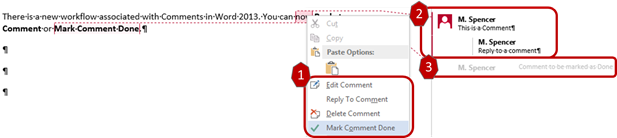
As shown above:
- Options to Reply To Comment and Mark Comment Done are available on the right-click menu. There is also an icon that displays to the right of the comment for replying.
- Comments and their replies will display together with replies being indented. They are treated as one object for deletion purposes.
- Comments that have been marked as done will be collapsed and grayed out. To see the content of the comment, you must click on it.
Submitted by - Michelle Spencer